Actions
Bug #2670
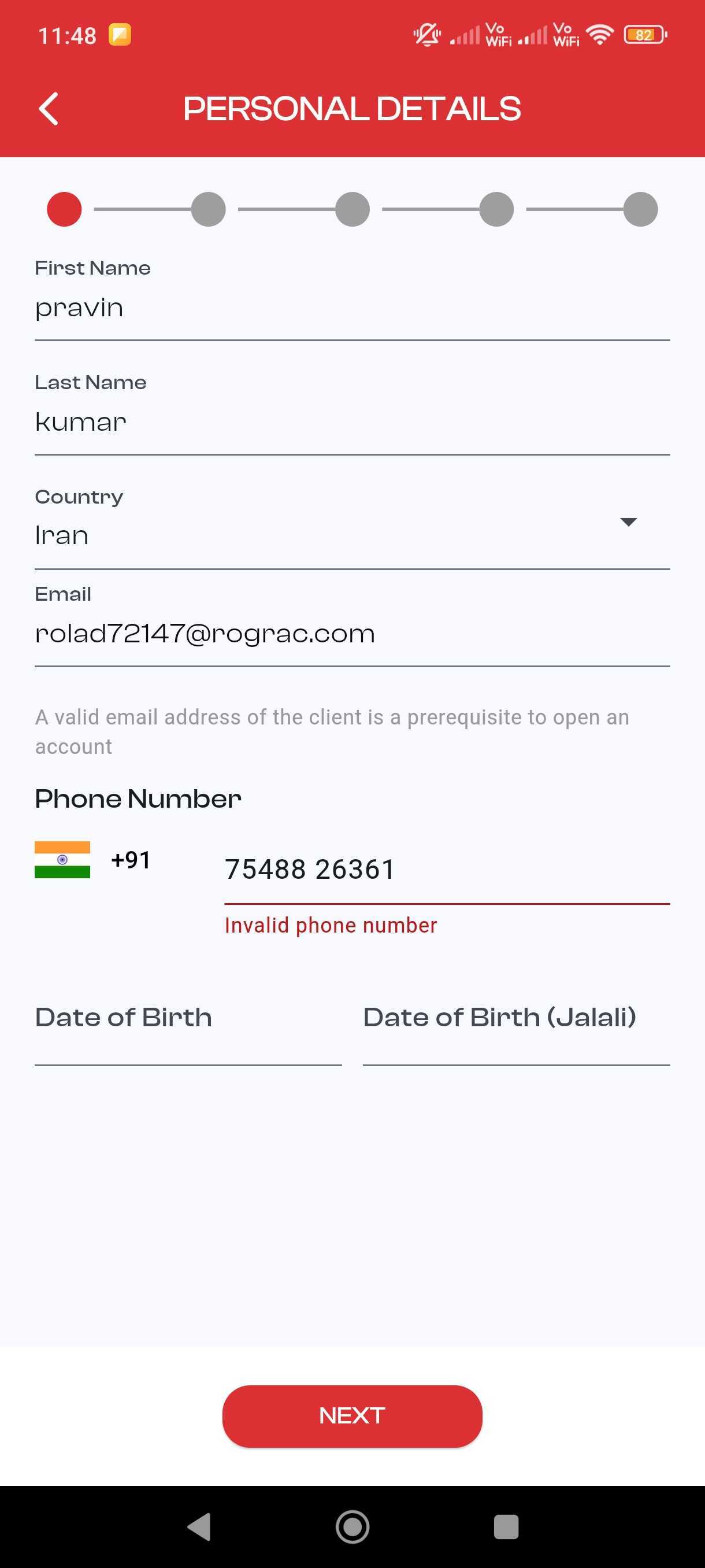
closed[Suggestion] The phone validation message appears after entering a valid number.
Description
Install and open the investor portal app.
Tap the open account > live account
Enter an incorrect phone number and click the submit button
Now, enter a valid phone number and click the submit button
Observe that the validation message still shows, and needs to disappear after entering a valid number.
Files
Updated by Dijin Joseph 4 months ago
- Project changed from 4 to ICM BROKERS MOBILE APPLICATION SVG
Updated by Muhammed Aslam 4 months ago
- Status changed from New to Resolved
- Assignee changed from Vimesh C to Muhammed Aslam
- % Done changed from 0 to 100
- Estimated time set to 2:00 h
No on user interaction validation message is disappearing
Updated by Pravin Kumar 4 months ago
The issue has been verified on Android and iOS devices.
Actions